PA Toll Pay
- 3.2
- Rating
- 500.00K
- Installs
- Free
- Price
 Analysis by App-foxy
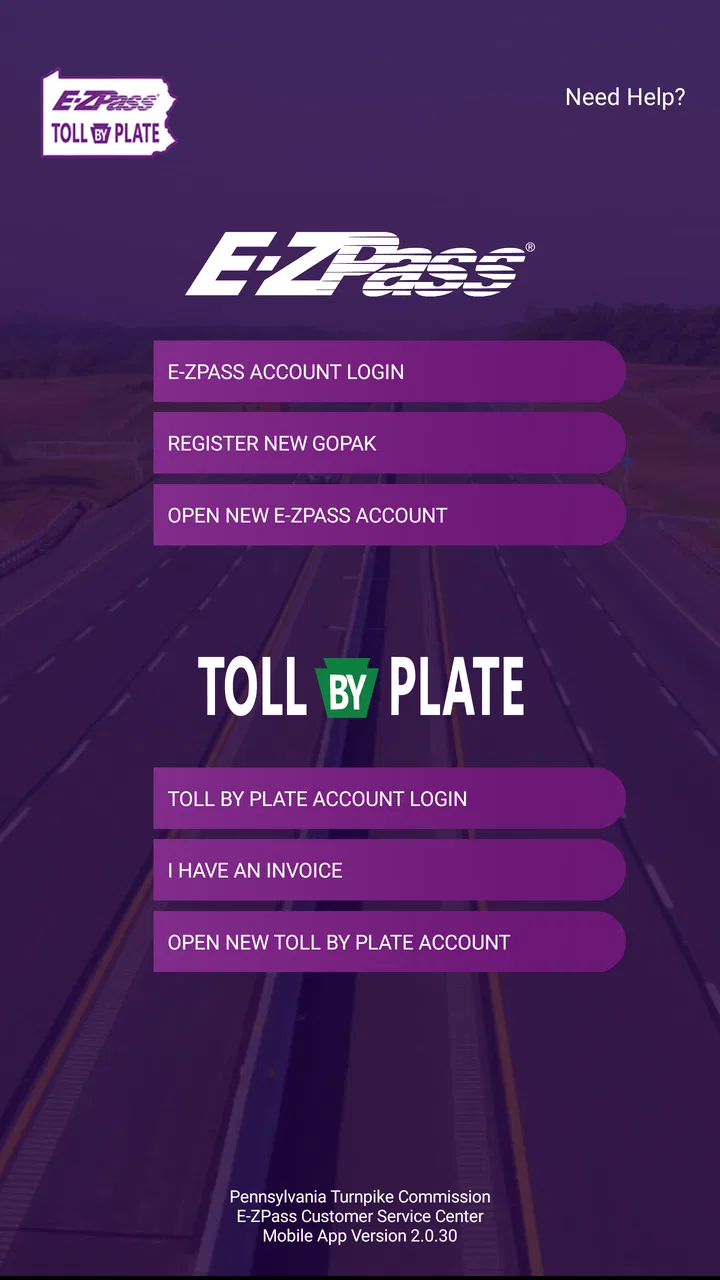
Driving on the Pennsylvania Turnpike is one of those tasks that becomes easy only after the account side is organized. PA Toll Pay is built for that specific job: it lets me view and manage a Pennsylvania Turnpike E-ZPass or Toll By Plate account from a phone. I see it as a practical account-management tool rather than a full travel planner, navigation app, or general-purpose payment wallet.
That distinction matters before downloading it. If I regularly use the Pennsylvania Turnpike, the app has a clear purpose. If I only need directions, traffic information, or toll estimates across several states, I would look elsewhere and use a broader travel service alongside it. My experience with this Travel & Local app is that its value comes from keeping toll-account chores close at hand, not from trying to replace every driving tool on my phone.
What I would decide before installing it
My first question would be simple: do I already have, or do I intend to use, a Pennsylvania Turnpike E-ZPass or Toll By Plate account? If the answer is yes, PA Toll Pay is relevant. It gives me a mobile place to check the account and deal with the information connected to turnpike travel instead of waiting until I am back at a computer.
You May Also Like

 Blood Strike: 2.5 Anniversary
Blood Strike’s Loadouts Turn Every Drop Into a Tactical Gamble
A close look at Blood Strike’s custom loadouts: how fast access to signature weapons reshapes its battle royale rhythm, rewards preparation, and narrows the gap between fights.

 Pandora - Music & Podcasts
Pandora’s Music Is Easy to Start, but Harder to Recover
Pandora’s strength is its low-effort path from a seed to a station. Its weak spot is how much confidence it asks you to place in connection, setup, and quiet recovery.

 8 Ball Pool
 Is Built on Rivalries, Rematches, and Routine
A close look at the rivalries, rematches, shared routines, and unanswered safety questions that turn a quick pool match into a persistent mobile community.

 Samsung Music
’s Quiet Strength Is Playing What You Already Own
Its reach comes less from spectacle than from dependable access to a personal library. That simplicity is both the app’s strongest retention engine and its ceiling.

 AccuWeather: Weather Radar
AccuWeather Review: A Quick, Clear Forecast for Everyday Decisions
For everyday plans, the best forecast is the one you can understand quickly. AccuWeather makes rain timing, radar, and local conditions easy to act on, with a few trade-offs.

 Hill Climb Racing
Why Hill Climb Racing Still Turns Crashes Into One More Run
A tiny car, a bumpy hill and one more upgrade: Hill Climb Racing keeps resurfacing because its simple chaos makes every near-miss feel personal.
More From Our News Desk



The second question is how often I need that access. A person who drives the turnpike for work, family visits, or repeated long-distance trips has more to gain than someone passing through Pennsylvania once. Frequent drivers benefit from being able to check their account as part of a regular routine. Occasional drivers may still appreciate the convenience, but the app is less likely to become an essential daily tool.
I would also separate account management from trip planning. PA Toll Pay is not the app I would open first to choose a route, compare fuel stops, or find hotels. Its job is narrower, and that narrow focus is actually useful when I am trying to resolve a toll-account question rather than plan the whole journey.
The app is free, carries an Everyone content rating, and runs on Android devices using version 5.0 or later. Those details make it approachable for a wide range of drivers, including people using an older phone. It was released on February 22, 2019, and the current version is 2.2.81. The developer shown for it is TransCore / Pennsylvania Turnpike Commission, which makes the app’s Pennsylvania-specific focus immediately understandable.
Its average rating is 3.3 from around 1.2 thousand ratings, while the app has received around 585 written reviews. I would not treat that score as an automatic rejection, but I would read it as a reminder to keep expectations realistic. A toll-account app is judged heavily on whether sign-in, account updates, and payment-related tasks feel dependable at the exact moment a driver needs them.
The everyday situation where it makes the most sense
Imagine that I have just finished a long drive on the turnpike and want to check whether the trip has appeared on my account. I am not looking for a map or a restaurant recommendation; I want to confirm the account status while the journey is still fresh. Opening PA Toll Pay gives me a more direct route to that task than searching through unrelated travel apps.
Another realistic situation is preparing for a busy travel weekend. I can use the app as part of a short checklist: open the account, review the information available there, and make sure I understand which account I am managing before setting off. The important benefit is not saving a dramatic amount of time on one visit. It is reducing the chance that I ignore a toll-account issue until it becomes inconvenient.
I also find the mobile format useful when responsibilities are shared. If one person drives and another handles household travel administration, having account access on a phone can make it easier to check information without sitting at a desktop. I would still avoid doing anything complicated while driving; this is an account tool to use before departure or after parking, not a reason to interact with a screen on the road.
Where the Pennsylvania focus is a real advantage
The strongest point is specialization. Instead of forcing me to search through a general transportation app, PA Toll Pay puts Pennsylvania Turnpike account tasks in one place. That can make the mental process clearer: when my question concerns my E-ZPass or Toll By Plate account, I know which app to open.
This is especially helpful for people who use Toll By Plate rather than relying only on an electronic transponder. Those two account situations can lead to different questions, and a Pennsylvania-specific account app is more relevant than a generic navigation product. I would still pay attention to the account type shown after signing in, because choosing the wrong account context can make a simple check feel confusing.
A second advantage is continuity. I do not have to treat every toll interaction as a one-time event. I can build a habit of checking the account before a major trip and again afterward. That workflow is more valuable than simply installing the app and forgetting about it. In my view, the app works best as a small piece of travel preparation, not as an emergency solution discovered only after a problem appears.
A third, less obvious strength is that it can reduce the gap between travel and administration. Toll matters are easy to postpone because the driving itself is finished. A phone-based account tool puts the administrative step in the same environment where I already handle other travel tasks. That does not guarantee a smoother account experience every time, but it makes follow-through more convenient.
How I would use it without creating extra friction
I would install it before a planned turnpike trip rather than at a roadside stop. I would sign in while connected to a reliable network, confirm that I am looking at the intended Pennsylvania account, and become familiar with the main account view before I need it urgently. This preparation is a small but worthwhile trade-off: a few minutes at home can prevent rushed troubleshooting during travel.
I would also keep a second route to account help available. That does not mean the app is useless; it means toll administration is important enough that I would not depend on a single screen if a payment or account issue were time-sensitive. If the app is slow, unavailable, or unclear, I want to know where I can continue the task rather than repeatedly retrying it.
For shared vehicles, I would establish whose account is being checked before making changes. This is a practical safeguard, especially when a household has more than one vehicle or more than one toll arrangement. The app’s Pennsylvania focus helps narrow the subject, but it does not remove the need to verify the account identity and vehicle context myself.
I would also use it after travel instead of waiting for a vague reminder. A quick post-trip check can become part of my normal routine, particularly if I use the turnpike often. The useful insight here is that the app’s benefit grows through repeated, deliberate use; it is less impressive when judged only as a one-time download.
Where other options may fit better
The usual alternative is a browser-based account portal. For a person who manages tolls only a few times a year, a website may be enough and may avoid adding another app to the phone. A browser can also feel more comfortable when I need to compare several pieces of account information on a larger screen. I would choose that route if my toll activity is rare and I do not value mobile access.
Another alternative is a general navigation app. That is the better companion when my main concern is the complete journey: directions, congestion, stops, and arrival planning. Such an app may help me decide whether to take the turnpike, but it is not a substitute for a Pennsylvania Turnpike account-management tool. The two categories solve different problems, so I would not judge PA Toll Pay unfairly for lacking the broader travel role.
Drivers who use toll roads in several states may prefer a wider toll-management approach, depending on their circumstances. A Pennsylvania-specific app is a good fit when the Pennsylvania Turnpike account is the center of the task. It is less convenient as a single home for every toll authority a frequent interstate traveler may encounter. In that case, I would use PA Toll Pay for the Pennsylvania account and keep a separate method for other jurisdictions.
I would also skip it if I do not have a Pennsylvania Turnpike E-ZPass or Toll By Plate account and have no reason to create or manage one. The app’s narrow purpose means it is unlikely to add value to a person who only wants a map, a road-trip checklist, or general travel inspiration. Installing it simply because it appears in the Travel & Local category would be a poor decision.
The rating also affects my expectations. A 3.3 average suggests that experiences are mixed enough for me to test the basic workflow before relying on it for an urgent matter. I would check whether I can sign in, reach the relevant account information, and understand the available actions. If those fundamentals work smoothly on my device, the app may be perfectly useful even though it is not universally loved.
What switching to it really costs
Because the app is free, the main cost of switching is not money. It is setup time, attention, and the need to adjust my routine. I may need to install it, sign in, identify the correct account, and learn where the information I care about is displayed. For a regular turnpike user, that initial effort is reasonable because the same account tasks may come up repeatedly.
The bigger trade-off is fragmentation. If I already use a browser, a navigation app, and another toll service, PA Toll Pay adds a Pennsylvania-specific destination rather than consolidating everything. That is not necessarily bad. A focused tool can be easier to understand than an overloaded one, but I need to accept that I may still switch between apps during a complete trip.
I would not replace a working method immediately if I have an important journey approaching. Instead, I would test PA Toll Pay during a calm period, compare the information I can access with the method I already use, and keep the familiar option available until I am comfortable. This is one of the most useful practical distinctions: downloading the app is low risk, but making it the only way I handle a time-sensitive account matter deserves a short trial first.
The age rating and broad Android compatibility also lower the barrier for households with different users and devices. Still, compatibility alone does not tell me whether the experience will feel equally smooth on every phone. I would judge it by the actual account workflow on my device, especially if I use an older handset or have limited patience for repeated sign-in steps.
Who should choose it, and who should pass
I would recommend PA Toll Pay to a Pennsylvania driver who already manages an E-ZPass or Toll By Plate account and wants a direct mobile route to that information. It is particularly sensible for frequent turnpike users, households managing toll travel for more than one vehicle, and people who prefer checking account matters from a phone before or after a journey.
I would recommend a cautious trial rather than an unconditional endorsement. The moderate rating means I would verify the basics early, and I would retain an alternative account-access method until the app proves dependable for my own needs. That is not a criticism of its purpose; it is sensible planning for any tool connected to travel payments and account administration.
I would pass if my needs are mainly navigation, cross-state toll comparison, or broad trip planning. In those cases, a general travel app or a browser-based approach may fit better. PA Toll Pay is most convincing when I stop asking it to be something else and use it for its actual role: managing a Pennsylvania Turnpike toll account from a mobile device.
My final recommendation is therefore straightforward. If Pennsylvania Turnpike account management is part of my regular driving life, I would install the free app, test the sign-in and account-view workflow before my next important trip, and make it part of my pre- and post-drive checklist. If I rarely use the turnpike or need one tool for every road system and travel detail, I would choose a broader alternative and treat this app as unnecessary.
For the right driver, its focused design is the reason to keep it. It does not need to plan my entire journey to be useful; it needs to make Pennsylvania toll-account tasks easier to reach when I am ready to handle them. Use it as a dedicated account companion, not as a complete travel suite, and the decision becomes much clearer.
FAQs for PA Toll Pay
01What is PA Toll Pay and how does it work?
PA Toll Pay is a mobile application designed to streamline the process of paying tolls on Pennsylvania's highways. Users can link their credit card to the app and pay tolls automatically as they pass through toll plazas. The app also provides real-time updates on toll amounts and transaction history, ensuring a hassle-free experience.
02Is the PA Toll Pay app available for both Android and iOS?
Yes, PA Toll Pay is available for download on both Android and iOS platforms. You can find the app in the Google Play Store for Android devices and the Apple App Store for iOS devices. It is designed to work seamlessly across both operating systems, offering a consistent user experience.
03Are there any fees associated with using PA Toll Pay?
While the PA Toll Pay app itself is free to download, users may encounter transaction fees depending on their payment method. It's important to review the app's terms and conditions or consult with your payment provider to understand any potential charges that may apply when using the app.
04How secure is the PA Toll Pay app in protecting my financial information?
The PA Toll Pay app prioritizes user security by employing advanced encryption technologies to protect your financial data. The app is regularly updated to address potential vulnerabilities, and users are encouraged to keep their app version up to date to ensure maximum security. Always use strong passwords and enable additional security measures if available.
05Can I use PA Toll Pay without an internet connection?
An internet connection is required to initially set up and manage your account on PA Toll Pay. However, once your payment method is linked and the app is set up, you can pay tolls without an active internet connection, as the app processes transactions automatically. For real-time updates and account management, an internet connection is necessary.
Pros
- Easy to navigate user interface.
- Quick payment processing.
- Secure payment options.
- Real-time toll updates.
- Supports multiple vehicles.
Cons
- Limited to Pennsylvania toll roads.
- Requires internet connection.
- Occasional app crashes.
- No offline payment feature.
- Limited customer support options.

PA Toll Pay
Gallery